
Google Workspace Backup Tool

Trusted Software for Complete Google Workspace Data Backup on Windows

Google Workspace Backup Tool is a reliable and secure solution to backup your entire Google Workspace (formerly G Suite) data. Whether it's Gmail, Google Drive files, Contacts, Calendar, or even Shared Drives. This utility makes it easy to save everything locally or migrate it to other platforms. Furthermore, it supports multiple export formats and comes with features that make the backup process flexible, accurate, and hassle-free.

  • Backup G Suite data into different formats, like PST, MSG, and others.
  • Migrate Google Workspace to Gmail, Office 365, and other email clients.
  • 100% safe & secure backup of G Suite data without data loss.
  • Protect data from accidental loss, hacking, or unexpected deletion.
  • Fast Processing speed & highly compatible with all Windows versions.
Sample Image

When to Use ConverterTools Google Workspace Backup Tool?

Explore several situations where using the G Suite Data Backup Tool is the effective & efficient choice.

 converter icon

To Backup All Google Workspace Data

The Google Workspace Backup Tool offers a reliable way to download and save your entire Google Workspace account data. It helps users to create a complete copy of Gmail emails, Google Drive files, contacts, calendars, and even Shared Drives. This backup can be saved on your computer or on an external storage device to prevent data loss.

 converter icon

Migrate G Suite Emails to Other Platforms

This tool is not just for backup, it also lets you move your G Suite emails to other platforms. You can export G Suite Emails to PDF format, Thunderbird, Office 365, Yahoo Mail, and other IMAP-supported email services. Additionally, this tool keeps your email formatting, folder structure, and attachments exactly as they are.

 converter icon

For selective email backup

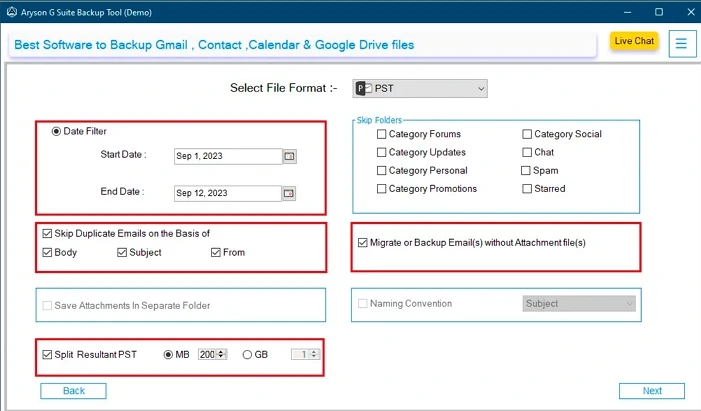
One of the key advantages of this utility is the Date Filter. This fe ature allows you to backup only specific emails from a selected time period. Instead of downloading your entire mailbox, you can set a custom date range and save only the emails you need. With the Date Filter, backup becomes faster and tailored to your needs.

Prominent Features of Google Workspace Backup Tool

Explore the Key Features of this Top-Notch Software for a More Accurate Backup.

Complete G Suite Data Backup

Complete G Suite Data Backup

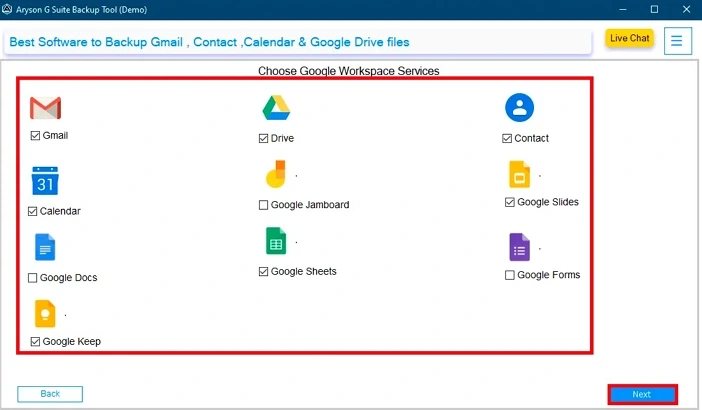
Google Workspace Backup & Restore Tool is an all-in-one solution to backup your entire Google account. It securely saves data from Gmail, Google Drive, Contacts, Calendar, Google Docs, Sheets, Slides, Keep, Forms, and Jamboard. The tool ensures safe storage of all files in one place to prevent accidental data loss or deletion.

Migrate MSG to Gmail & More

Bulk Backup Capabilities

G Suite Backup Tool offers advanced bulk backup functionality. It allows you to backup multiple Google Workspace user accounts at once, which saves time and effort. With just a few clicks, you can download all emails, Drive files, contacts, and more from several accounts within minutes. Ideal for businesses and IT admins.

Save G Suite File to File Formats

Save G Suite File to File Formats

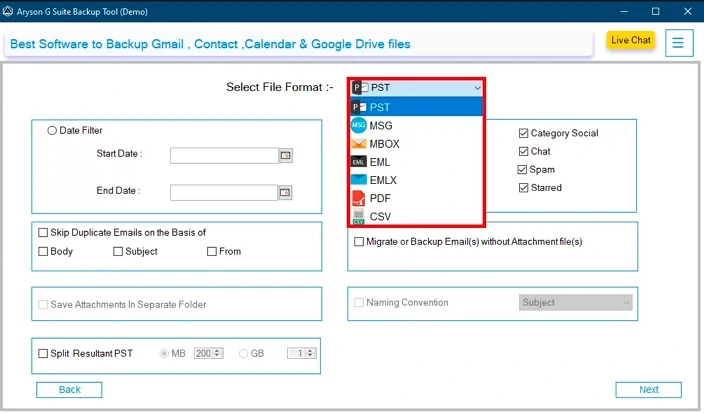
This top-notch utility tool lets you export Google Workspace data into multiple file formats. You can export G Suite mailbox to PST, MSG, MBOX, EML, EMLX, PDF, and CSV. This makes it easy to store your data safely for future use. It's flexible, fast, and user-friendly.

Migrate G Suite Data to  Email Clients

Migrate G Suite Data to Email Clients

With this multifunctional software, you can migrate G Suite data to several email client platforms. It includes Hotmail, iCloud, Zoho Mail, Yahoo Mail, and AOL Mail. Furthermore, you can also transfer G Suite data to another G Suite account without data loss or minimal disruption.

Ability to Split Resultant G Suite Data

Ability to Split Resultant G Suite Data

Google Workspace Backup Software offers a smart feature to split large backup files into smaller parts. This helps manage big data files easily and prevents corruption or storage issues. You can set the file size limit, and the tool will automatically divide the data. This makes it easier to store, transfer, or upload.

Offers to Remove Duplicate Emails

Offers to Remove Duplicate Emails

Apart from the Google Workspace backup emails, the Google Workspace Backup Tool includes a built-in feature to remove duplicate emails. It automatically excludes duplicate emails based on subject, sender, and date. This helps reduce backup size, saves storage space, and keeps your data clean and organized.

Preserve Data Formatting & Structure

Preserve Data Formatting & Structure

This utility ensures that all emails and files retain their original formatting and folder structure during backup or migration. It keeps metadata, attachments, and hierarchy intact, so your data looks and works the same after restoration. This makes accessing and managing backed-up data easier and more reliable.

Define the Desired Path to Save

Define the Desired Path to Save

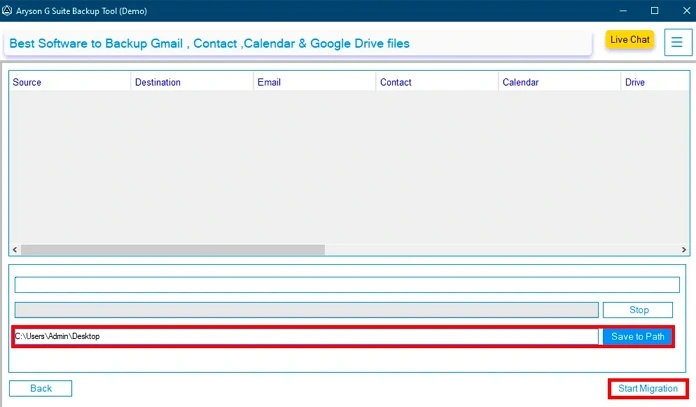
G Suite Backup Tool lets you choose where to save your resultant backup files. You can select any folder on your computer or an external drive, which gives you full control over your data storage. This flexibility helps you organize backups according to your needs and makes data management simple.

Free (Demo) Version of this Tool

Free (Demo) Version of this Tool

Try the Google Workspace Data Backup Software for free with the demo version. It lets you explore the key features and backup a limited number of emails before buying. This way, you can test the software’s performance and ease of use risk-free before making a purchase.

Compatible With Windows Versions

Compatible With Windows Versions

This advanced application is fully compatible with all major Windows versions, including Windows 11, 10, 8, and 7. It runs smoothly on both 32-bit and 64-bit systems, which ensures a reliable performance across a wide range of computers. It gives effective results on all PC.

Why Need Google Workspace Backup Tool?

Here are Some Scenarios Where You Need to Backup Your G Suite Data

Accidental Deletion of Important Data

Users often delete emails or files by mistake. Without backup, recovering permanently deleted items is impossible. The Google Workspace Backup & Restore Tool helps you create a safe copy of all your data. So, you can easily restore lost items whenever needed and ensure no valuable information is gone for good.

Protection Against Hacking or Malware

Cyberattacks or malware infections can corrupt or delete your Google Workspace data. With regular backups, you can quickly restore your Gmail, Drive, Contacts, and more without relying on Google’s recovery options. This adds an extra layer of protection for sensitive business or personal information. That's why this advanced utility is useful.

User Account Deactivation

When employees leave an organization, their accounts are often deleted or deactivated. In such cases, this can result in the loss of essential data like emails, documents, and contacts. With the help of backing up user accounts with this tool, businesses can preserve important records and reuse or transfer data without any risk of loss.

Why Choose Google Workspace Backup Tool?
Discover why the G Suite Data Backup is the go-to solution for secure email Backup & migration.

Google Workspace Backup Software is a trusted and easy-to-use solution for backing up and migrating your G Suite data. It safely saves emails, Drive files, contacts, and more to your computer or external storage. You can export data in multiple formats and move it to platforms like Outlook or Office 365. With fast speed, secure processing, and full data accuracy, it’s the perfect tool for both individuals and businesses.

Quick Steps to Backup G Suite Data-

  • Download & Install the Google Workspace Backup Tool.
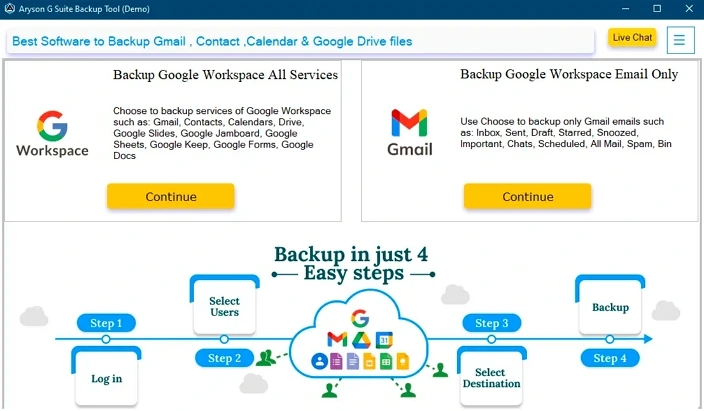
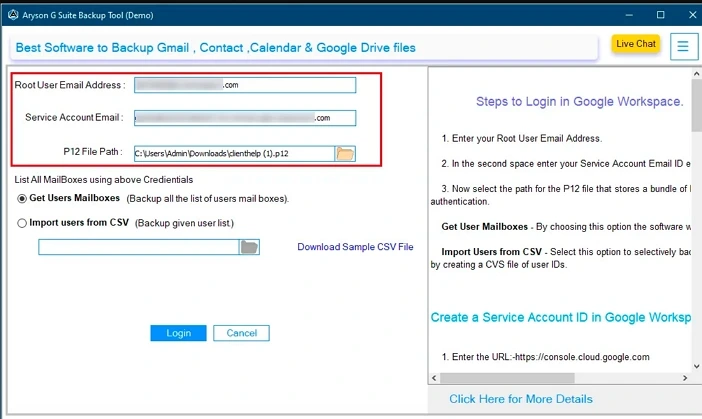
  • Enter G Suite credentials (Name, ID, P12 File Path). Click Login.
  • Choose a Backup option like Mail, Contacts. Click Next.
  • Select the Saving format from the given options.
  • Apply advanced features and click Start Migration.

Key Advantages of Google Workspace Backup Tool
Utilize the key features of this tool for fast & quick results.

  • Offer several backup options like Contact, Calendar, Drive, Docs, etc.
  • Ability to select a G Suite account to initiate the backup & migration.
  • Export G Suite email to EML, PST, MSG, MBOX, PDF, and CSV.
  • Option to migrate Google Workspace file to Gmail, Office 365, etc.
  • A feature to preview the G Suite data before saving or migrating it.
  • Provide a Remove Duplicate option to exclude duplicate emails.
  • Use Date Filter for a selective email migration based on Start & End dates.
  • Simple interface, which means non-tech users can easily operate it..
  • Fast processing speed and fully compatible with all Windows versions.
Technical Specifications

About Product


ConverterTools Software for Windows

Trial Limitations

TThe free version of the Google Workspace Backup Tool offers the same features and benefits as the full version. The only limitation is that it allows the conversion of up to 50 emails per folder from each G Suite file.

Version

25.05

Windows

Download

System Requirements


Processor

Intel® Core™ 2 Duo CPU E4600 @ 2.40GHz

Operating System

Windows 11/10/8.1/8/7/Vista/XP/2000/98/NT and 95 and Windows Server 2012/2008 R2/2008/2003 R2/2003

Memory

8 GB of RAM (8 GB is recommended)

Hard Disk

256 GB Free Space Required

Download Guides


Google Workspace Backup Tool- Free vs Full Version

Get an overview of the G Suite Backup Features between the Free & Full versions

Product Features Free Version Full Version
Backup G Suite emails to PST, PDF, EML, MSG, CSV, and others. 50 Emails Per Folder All
Migrate Google Workspace data to Office 365, IMAP, Hotmail, Zoho Mail, iCloud, and others. 50 Emails Per Folder All
Save Google Contacts, Calendar, Meet, Drive, Docs, Sheets, Forms, and others. 15 Items Locally All
Apply Date Filter
Remove Duplicate Emails
Save with or without Attachments
Simple & easy-to-use interface
Compatible with all Windows versions
24/7 tech support & 100% secure
Price Free $49
purchase

Frequently Asked Questions

The best way to backup Google Workspace emails is by using a professional tool like ConverterTools Google Workspace Backup Tool. It lets you save all your Gmail data in formats like PST, EML, or PDF directly to your system.
Yes, you can easily export your Google Workspace emails to Outlook by saving them in PST format using this tool. The file can then be opened in Microsoft Outlook without any data loss.
Follow these steps:
  • First, launch the Google Workspace Backup Software.
  • Then, enter your G Suite credentials and click Login.
  • Choose the Backup options from the given list. Hit Next.
  • After that, select the PDF from the save option.
  • Apply advanced features and click Next
  • Lastly, define Path to Save and click Start migration.
This tool allows you to backup all your Google Drive files and documents directly to your computer or external drive in just a few steps.
Yes, the tool has a Date Filter option. You can set a date range to backup only selected emails instead of the entire mailbox.
Yes, you can transfer your Google Workspace emails, contacts, calendar, and files to another Gmail or G Suite account without losing any data.
Yes, a free trial version is available. It lets you back up up to 50 emails per folder so you can test the features before buying the full version.