When to Use the Best OST to PST Converter Tool?

Know the Best Use of OST File to PST Converters in the Following Situations.

To Convert OST Files to PST Effortlessly

To Convert OST Files to PST Effortlessly

The OST to PST Conversion Tool enables simultaneous conversion of multiple OST files to PST format. It efficiently handles large OST files along with their attachments, offering a fast and reliable solution. This tool significantly reduces processing time, making it ideal for converting extensive data volumes within minutes.

Need to Import OST Files in Office 365

Need to Import OST Files in Office 365

You cannot open OST files directly in Office 365. Typically, they must be converted to PST format, which is a time-consuming process. That’s where the Outlook OST Converter Tool comes in handy. It lets you import OST files to an Office 365 account without converting them to PST. Thus, direct migration makes the process simple and fast.

Convert OST Files Without Outlook

Convert OST Files Without Outlook

If you need to open OST files without Outlook, the OST to PST Converter Tool is a reliable solution. It allows you to convert OST files into PST format without requiring Outlook installation. One can also preview OST data before converting it. Additionally, it supports bulk conversion, making it easy to access and view multiple OST email files simultaneously.

Benefits of Outlook OST File to PST Converter

product-box
Google review trust-pilot review
  • OST Converter Tool lets users convert OST files to PST, EML, MSG, EMLX and MBOX email formats.
  • The software can process multiple OST files simultaneously to backup or migrate, saving time.
  • Backup OST files into PDF, DOC, DOCX, DOCM, CSV, MHTML, HTML, VCF, PNG, GIF, TIFF, JPG, and ICS.
  • Supports conversion of orphaned OST files without requiring Outlook installation.
  • Migrate OST files to Office 365, Gmail, G Suite, Yahoo Mail, and other Email Clients. (AOL, Thunderbird, Hotmail, IMAP, Zoho Mail, Yandex Mail, and iCloud)
  • In-built Preview feature enables users to open and view OST data prior to conversion.
  • Enables selective OST mailbox conversion with an advanced Date Range Filter.
  • To filter out identical or unwanted clutter from OST files, the tool offers a Remove Duplicate feature.
  • Split Resultant PST File helps break down oversized OST into smaller and manageable PST files.
  • The best OST Converter preserves folder hierarchy, minimizes downtime, and ensures 100% data privacy.
  • In addition, the software is easy to operate and compatible with all versions of Windows OS.

Exclusive Features of Microsoft OST to PST Converter Tool

Explore the essential features that users look for in the best OST file to PST Converter.

All-in-One Solution to Export OST to PST

All-in-One Solution to Export OST to PST

OST to PST Converter is a comprehensive tool that enables fast and accurate OST file to PST conversion. It handles large files and folders effortlessly. Additionally, the tool exports OST file contents, including inbox, outbox, sent items, drafts, trash, archive, and spam, into various formats compatible with multiple email clients.

Convert Single or Multiple OST Files at Once

Convert Single or Multiple OST Files at Once

Outlook OST Software lets you export single or multiple OST files to PST format at once. It also converts OST files or folders into various formats and email clients simultaneously. This tool saves time while ensuring secure and accurate OST data transfer.

Export OST Files to Different File Formats

Export OST Files to Different File Formats

Using this OST Migrator tool, you can efficiently migrate OST files into Outlook Personal Storage Table (.pst) format with 100% accuracy. The tool also supports multiple export formats, including MBOX, EMLX, PDF, CSV, MSG, DOC, DOCX, EML, HTML, and more.

View OST Emails and Attachments without Outlook

View OST Emails and Attachments without Outlook

This OST solution allows you to preview OST file contents along with all attachments. You can view email items in a separate window, making it simple to locate. If you want to migrate specific data and exclude the rest, the preview panel allows you to choose from OST mailboxes.

Migrate OST Files into Various Email Clients

Migrate OST Files into Various Email Clients

OST Converter Software enables users to directly export OST files to various cloud and web-based email platforms. Thus, one can easily migrate OST files to Gmail, Yahoo Mail, Office 365, AOL, IMAP, Zoho Mail, and others. Moreover, it supports OST to Thunderbird migration.

Selectively Convert OST Emails by Date Range

Selectively Convert OST Emails by Date Range

If you need to move emails from OST to PST on a particular date, OST to PST Converter has a Date Filter. You can use the feature to convert your data from a particular date. You just select the starting and ending dates to pick a range of emails, and only emails from the selected dates will be transferred.

Export OST to PST File Without Duplicates

Export OST to PST File Without Duplicates

The OST Conversion Software provides a remove duplicate emails feature. This keeps the real emails and deletes all the extra copies from OST files. You can set criteria to filter duplicate emails. Only the unique email in your inbox will be converted, and any extras will be eliminated.

Windows OS Supported OST Converter

Windows OS Supported OST Converter

The free OST to PST Converter is highly flexible and supports a wide range of Windows versions, both old and new. This ensures users can easily run the software on any Windows system and perform conversions without compatibility issues.

Convert OST to PST Without Losing Folder Hierarchy

Convert OST to PST Without Losing Folder Hierarchy

The OST Migrator is reliable and efficient software that preserves data originality and maintains the mailbox folder hierarchy during conversion. It also ensures consistent data formatting when converting OST files to MBOX, PDF, MSG, and other supported formats.

Run Free OST to PST Converter for Evaluation

Run Free OST to PST Converter for Evaluation

Download the free demo OST to PST Migrator Tool for evaluation. It allows users to convert OST emails to PST format and save up to 50 items per folder. This trial version includes all the same features and functions as the paid one, making it a great way to try before purchasing.

Software Specification

Download the Best OST to PST Converter Tool after browsing these specifications for ease of use.

About Product

Trial Limitations: The Free OST to PST Converter Tool is for evaluation. It can only convert up to 50 files of each type as a trial.

Version: 25.05

System Requirements

  • Processor: Intel® Core™2 Duo E4600 Processor 2.40 GHz
  • OS:Windows 11, 10, 8.1, 8, 7, XP (32 & 64 bit), and other Windows versions.

  • Memory: 8 GB RAM (recommended)
  • Disk: Minimum Disk Space: 512 GB

How OST to PST Converter Works?

The OST to PST Converter Tool makes the complex conversion process easy. Perform a few simple steps to convert OST files hassle-free.

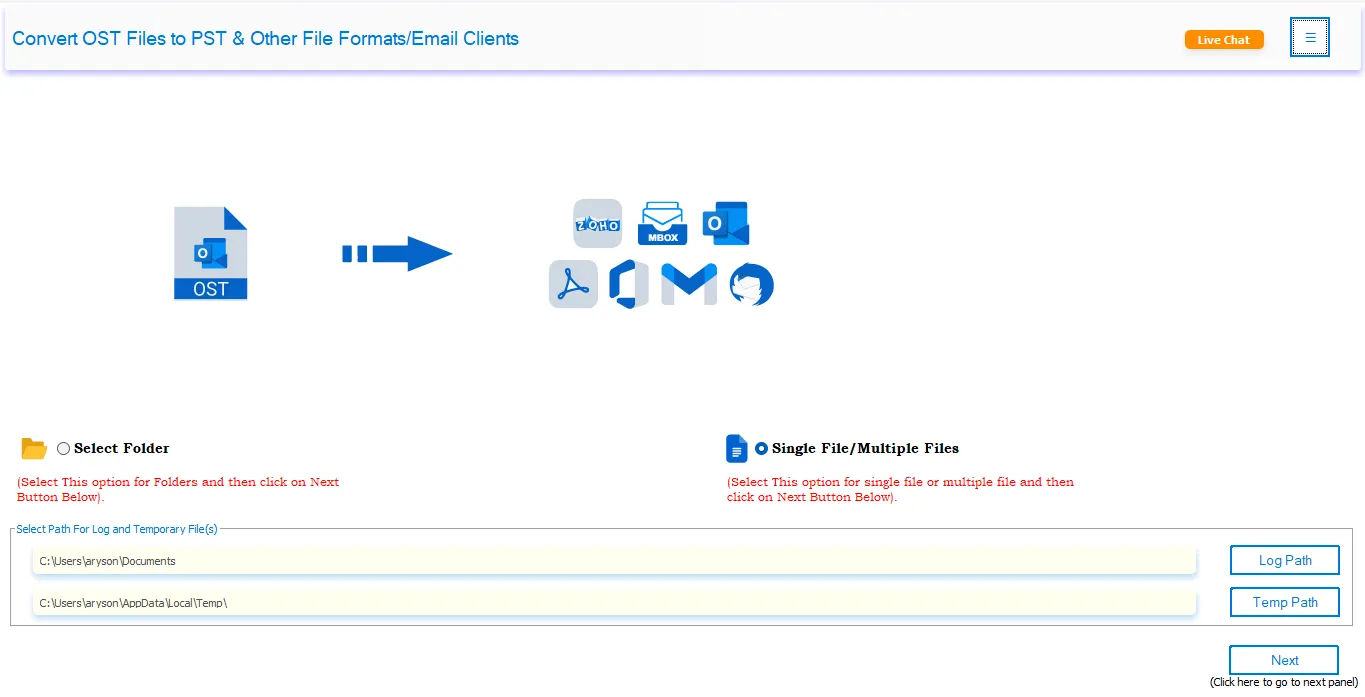
Step 1: Install and run the OST to PST Converter Tool on your system.

OST to PST Converter Tool

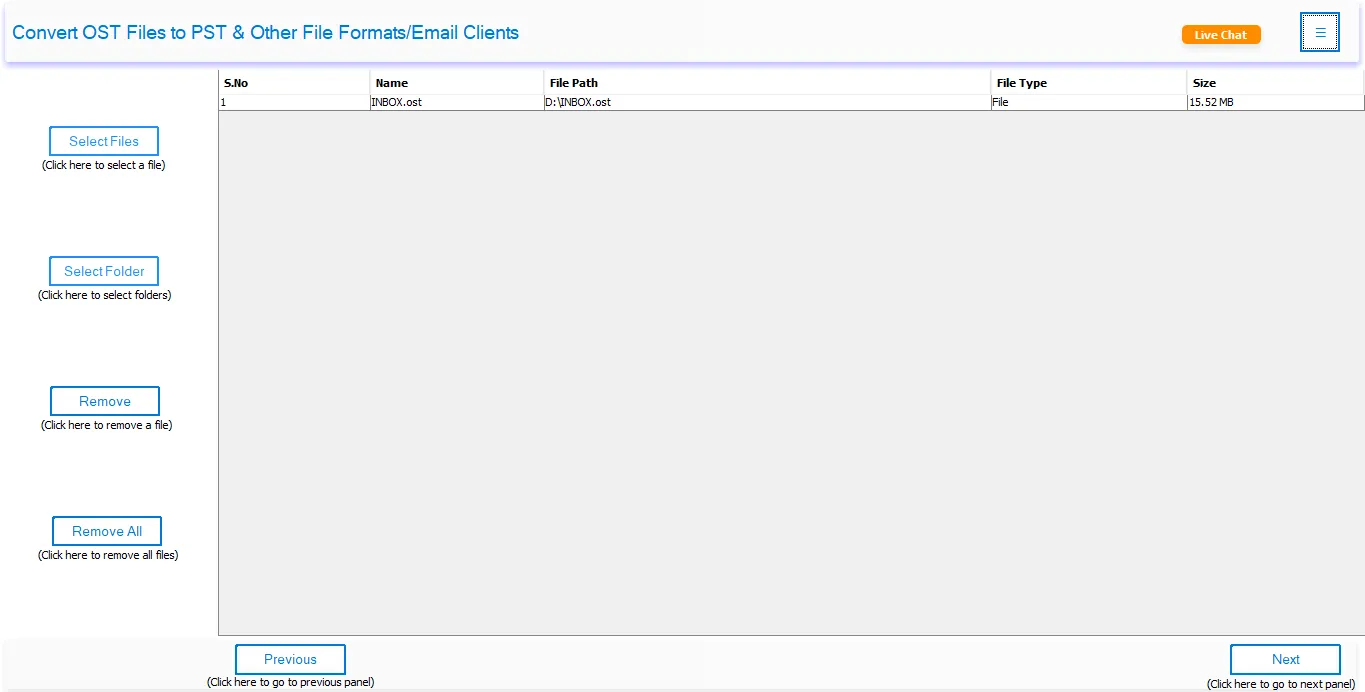
Step 2: After that, click on Single File/Select Folder and OST files.

Single File/Select Folder

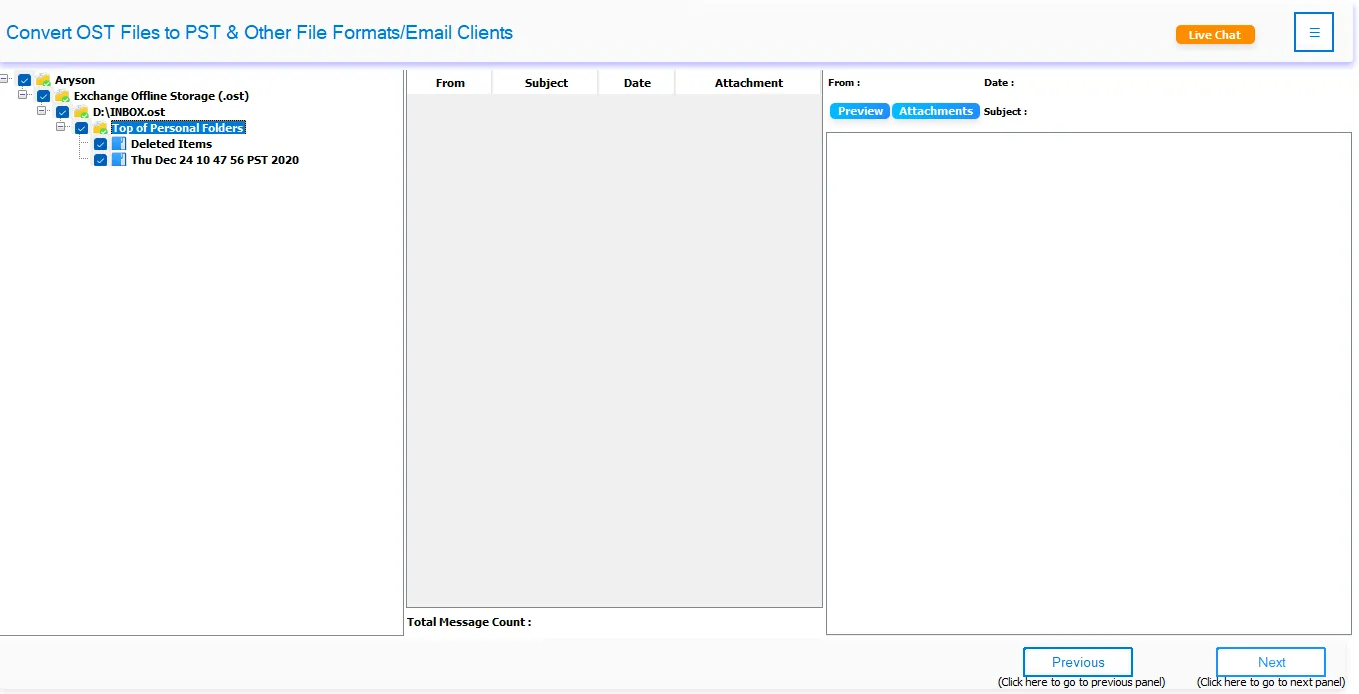
Step 3: Preview OST emails in the tree-like structure and click Next.

 click Next

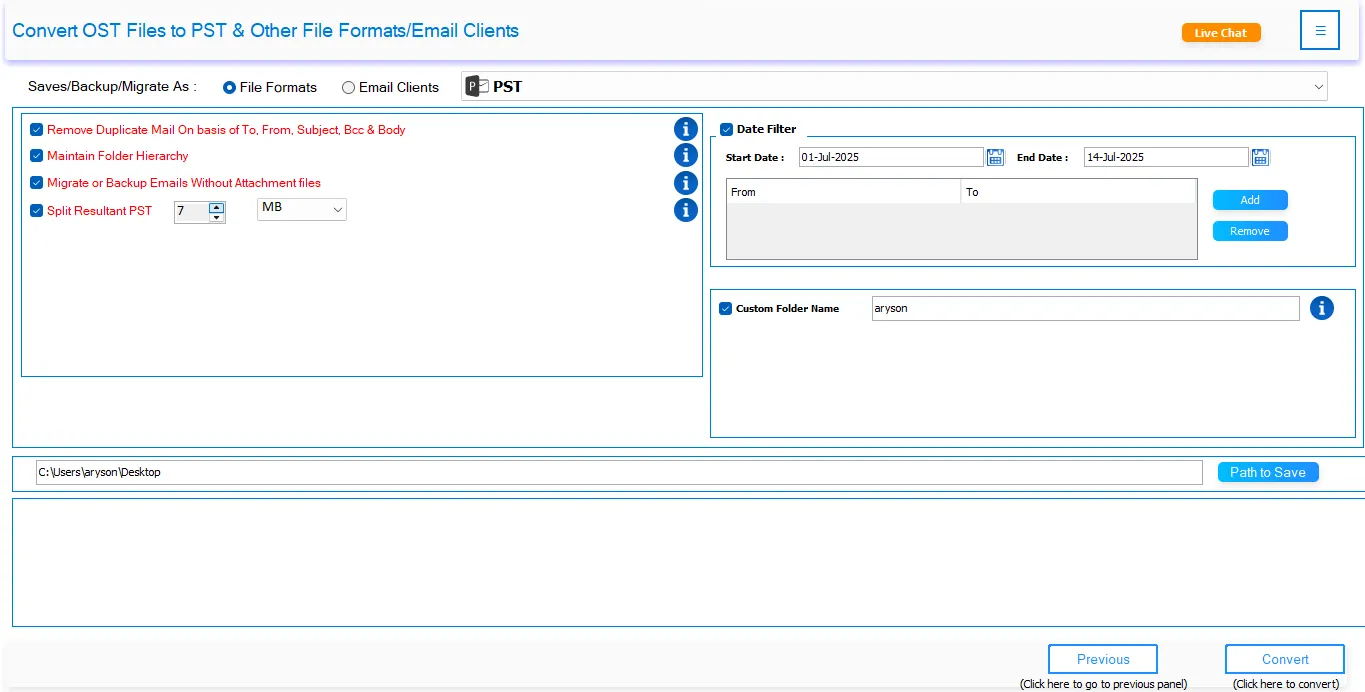
Step 4: Choose PST or another file format as the saving option.

Choose PST

Step 5: If needed, apply additional filters and click on the Convert button.

click on the Convert button

OST to PST Converter Tool: Free & Full Version

Know the differences between the demo and licensed versions of the software.

Product Features Free Version Full Version
Convert Bulk OST into a PST file 50 Emails Per Folder All
Export OST to PST, CSV, MSG, MBOX, EML, HTML, EMLX, and MHTML. 50 Emails Per Folder All
Migrate OST Items into Gmail, Office 365, Thunderbird, G Suite, AOL, Yahoo, Yandex Mail, Zoho Mail, and Others 50 Emails Per Folder All
Save OST files into PDF, TIFF, ICS, PNG, JPG, GIF, DOC, DOCX, and DOCM. 50 Emails Per Folder All
Remove Duplicate Emails
Save In the Same Folder
Maintain Folder Hierarchy
Migrate or Back Up Emails Without Attachment Files
Date Range Mail Filter
Custom Folder Name
Naming Convention (Saving Formats)
24/7 Tech Support & 100% Secure
Purchase Option Download Buy Now

Frequently Asked Questions

Check out these commonly asked user queries and their solutions for the OST Converter Tool.

Convert OST file into PST in a few simple steps:

  • Download the OST to PST Converter Tool on your computer.
  • Now, select Select Files or Select Folders to import the OST file.
  • Choose OST files to convert and tap Open to add. Click Next.
  • Preview emails and select the file/folder, and click Next.
  • Select PST as a saving format and apply advanced features.
  • Lastly, specify the location to save the output file and click Convert.
Yes, you can. The OST to PST Converter supports batch conversion, so you can process many files at once. This feature of the software saves time and effort compared to converting each file individually.
Indeed. A top-notch OST to PST Converter Tool ensures all your email attachments remain intact during the conversion. It preserves every file sent or received with your emails and makes sure all attachments stay accessible and usable in the converted PST files.
By using the OST to PST Converter, you can easily convert your OST file into a PST file. However, if your OST files are corrupted or inaccessible, use the OST Recovery Tool first to repair them. Once you have recovered data into a new OST, the OST Converter can convert it to PST.
Yes, Outlook OST Converter enables offline OST conversion of your OST file into PST format. The tool works independently and does not require the Outlook application. Also, it can easily handle bulk data at once.
First, ensure that your system is compatible with the requirements of the Outlook OST Converter. In case you have any issues with the application, you are free to contact our Live Chat Support, who will try their best to assist you.
Absolutely! You can use the free OST to PST Converter Tool, a demo version of the software. It will change your OST files into Outlook PST format, but it has certain limitations. The demo version allows you to convert only up to 50 items per folder at no cost.

OST to PST Converter - Reviews

Know Our Happy Clients Say About OST to PST Conversion

Live Chat

Live Chat